Want to check your FBR filer status in 2026 (5 simple methods)
To check your FBR filer status in Pakistan, send your CNIC number via SMS to 9966, or visit the FBR online verification portal at fbr.gov.pk. You can also use the Tax Asaan mobile app or log into the IRIS portal to confirm your Active Taxpayer List (ATL) status.
If you have ever been charged extra tax on a bank transaction or a property deal, there is a good chance your Federal Board of Revenue (FBR) filer status was the problem. The Federal Board of Revenue governs Pakistan's tax system, and every Pakistani taxpayer—whether an individual professional or a large business—needs to know exactly where they stand on the Active Taxpayer List.
Modern tools like Finsmart FBR Digital Invoicing Software are helping businesses stay compliant effortlessly, but the first step for any individual or business owner is verifying their own standing. By the end of this guide, you will know exactly how to check your FBR filer status in under 60 seconds.
What does FBR filer status actually mean for you?
Your FBR filer status simply shows whether the government recognizes you as an active taxpayer. When you file your annual income tax return, the Federal Board of Revenue places your name on the Active Taxpayer List (ATL).
Who qualifies as a filer? Individuals who have submitted their income tax returns successfully qualify. Companies and Associations of Persons (AOPs) that meet their annual filing requirements also achieve active status.
Being a non-filer brings real financial consequences. Non-filers face significantly higher withholding taxes on everyday banking transactions. The government also places heavy restrictions on non-filers who want to buy property or purchase new vehicles. Furthermore, non-filers run a high risk of receiving official notices and strict penalties from the tax authorities. The good news? Checking and fixing your status takes only a few minutes.
Why should you check your FBR Active Taxpayer List status?
Remaining on the Active Taxpayer List provides direct financial benefits. Active filers enjoy lower tax rates on salaries, banking withdrawals, and investments. Filers are also the only citizens eligible for tax refunds, and they experience smooth processing for property and vehicle transactions.
For business readers, active filer status unlocks even more opportunities. Filer businesses are eligible to bid for government tenders and lucrative public contracts. Maintaining active status prevents blocked business registrations and keeps your financial records penalty-free.
If you manage a business processing invoices worth millions of rupees, staying FBR-compliant is critical. This is exactly the problem Finsmart FBR digital invoicing software was built to solve. Finsmart FBR Digital Invoicing Software has helped over 500+ companies across Pakistan manage their invoices effectively without a single compliance penalty.
What are the 5 ways to check your FBR filer status?
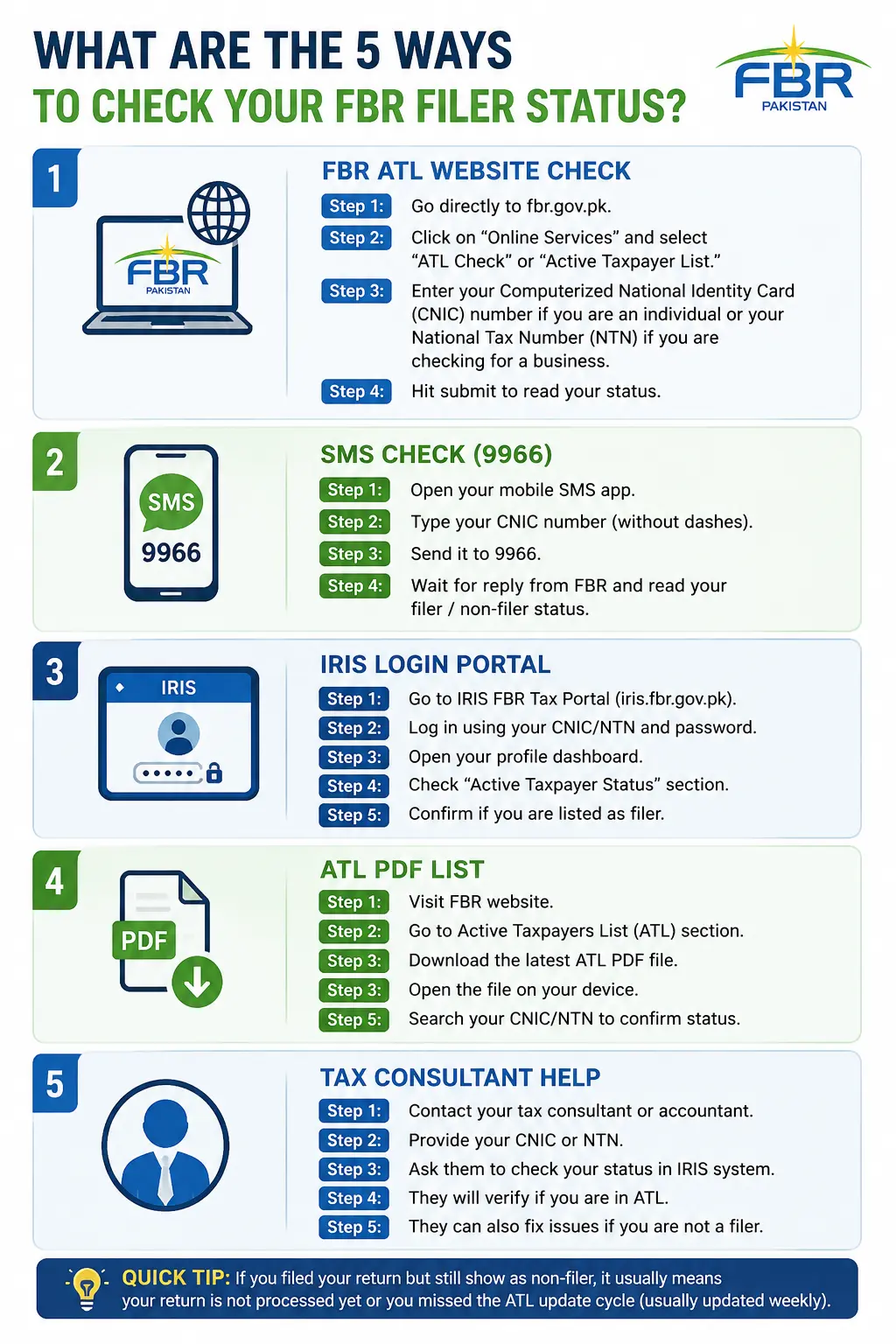
1. How do you check your status via the FBR official website?
Using the desktop portal is the recommended method for verifying your Active Taxpayer List standing.
Step 1: Go directly to fbr.gov.pk.
Step 2: Click on "Online Services" and select "ATL Check" or "Active Taxpayer List."
Step 3: Enter your Computerized National Identity Card (CNIC) number if you are an individual or your National Tax Number (NTN) if you are checking for a business.
Step 4: Hit submit to read your status.
Reader tip: Make sure you enter your CNIC without dashes. A small formatting mistake can trigger a system error. The system will display "active" for filers and "inactive" or no record for non-filers.
2. How do you use the Tax Asaan mobile app for status checks?
Download the Tax Asaan application from the Google Play Store or Apple App Store. Users do not need a login to perform a quick check; they can use the guest feature. Navigate to the ATL Status section and enter the relevant CNIC or NTN.
Reader tip: The Tax Asaan app provides the fastest and most convenient method for users who prefer working from their smartphones.
3. How can you check your filer status via SMS to 9966?
For those without internet access, SMS is the quickest method available. Open your phone's SMS application. Type your 13-digit CNIC number and send the message to 9966. The Federal Board of Revenue will send an instant automated reply confirming your exact status. This SMS service works across Jazz, Zong, Telenor, and Ufone networks.
Reader tip: Use the 9966 SMS method right before any major financial transaction. The process takes less than 30 seconds.
4. When should you call the FBR Helpline at 051-111-772-772?
If online systems fail, you can call the official helpline. Have your CNIC or NTN ready before dialing 051-111-772-772. Ask the customer service representative to confirm your Active Taxpayer List status.
Reader tip: The helpline works reliably, but callers should expect some wait time. Use this method primarily when other digital methods give unclear results.
5. How does the IRIS Portal provide detailed status information?
The IRIS portal offers the most detailed view for registered taxpayers. Visit iris.fbr.gov.pk and log in with your registered credentials. Once inside, you can view your full tax return history alongside your real-time filer status.
Reader tip: If you run a business or take your taxes seriously, maintaining an active IRIS account is non-negotiable.
How does Finsmart solve compliance for Pakistani businesses?
Checking your personal filer status is only the first step. For businesses, FBR compliance goes much deeper. Finsmart FBR Digital Invoicing Software is an advanced solution built specifically for Pakistani businesses.
Software generates FBR-integrated digital invoices automatically. The platform ensures every invoice is verified and compliant with government regulations, completely eliminating the risk of tax penalties.
The impact speaks for itself. Finsmart FBR Digital Invoicing Software currently supports 500+ companies across Pakistan. These businesses manage invoices worth millions of rupees effectively, and they maintain zero FBR penalties. Finsmart FBR Digital Invoicing Software serves diverse industries, including retail, e-commerce, manufacturing, services, and healthcare.
Key features include real-time FBR integration, automated invoice generation, instant verification, and a penalty prevention dashboard. Digital invoicing software suits both small businesses and large enterprises. Ultimately, Finsmart FBR Digital Invoicing Software removes the guesswork from invoicing compliance entirely.
How does the Active Taxpayer List (ATL) update cycle work?
FBR updates the Active Taxpayer List every Monday. Filing your tax return does not instantly make you a filer. Taxpayers must allow 7 to 10 days for the system to process their return and reflect their active status. If your status has not been updated, wait for the next Monday update cycle or cross-check your profile on the IRIS portal.
If you miss the annual filing deadline, you must pay an ATL surcharge to activate your status. The ATL surcharge is PKR 1,000 for individuals and PKR 10,000 for companies and AOPs. Taxpayers can pay this surcharge via PSID or CPR through any major bank. Paying the surcharge is far cheaper than suffering the ongoing financial losses tied to non-filer status.
What should you do if your FBR status shows incorrect information?
Even the best systems encounter issues. Here is how to handle common FBR status problems.
Problem 1: Status still shows non-filer after filing.
Solution: Wait for the Monday ATL update cycle. Check your status again after 7 days have passed.
Problem 2: CNIC not recognized on the FBR portal.
Solution: Verify that your NTN is properly registered. Call the FBR helpline if the system continues to reject your identity card number.
Problem 3: Mismatch between portal status and actual filing.
Solution: Log directly into the IRIS portal for the most accurate and detailed status check available.
Problem 4 (For Business Owners): Receiving FBR penalty notices on invoices.
Solution: This is exactly where Finsmart FBR Digital Invoicing Software saves your business. The platform's automated compliance system prevents invoice-related penalties before the tax authorities ever issue a notice.
How can you become an active filer if you are currently unregistered?
It is not too late to fix your tax status. To become an active filer, you must register on the IRIS portal at iris.fbr.gov.pk. Next, obtain your National Tax Number (NTN). File your annual income tax return before the September 30 deadline. If that deadline has already passed, simply pay the ATL surcharge. Finally, confirm your active status after the 7-to-10-day processing period.
Business readers should pair their FBR registration with Finsmart FBR Digital Invoicing Software to automate invoicing compliance from day one.
Secure your financial future by verifying your tax status today
Your FBR filer status directly affects how much tax you pay, what transactions you can execute, and how partners perceive your business. Do not leave this critical metric unchecked. You can verify your standing through the FBR portal, the Tax Asaan app, the IRIS dashboard, or the official helpline. The absolute easiest method remains sending your CNIC via SMS to 9966.
For business owners, the 500+ companies using Finsmart FBR Digital Invoicing Software are proof that managing FBR invoicing compliance does not have to be stressful or complicated. Check your filer status right now—it takes less than 60 seconds and could save you thousands of rupees.
Frequently Asked Questions
1. How much does it cost to check my FBR filer status?
Checking your FBR filer status online through the official portal, IRIS, or the Tax Asaan app is completely free. Checking your status via SMS to 9966 incurs standard network messaging charges.
2. How long does it take for my name to appear on the Active Taxpayer List?
The Federal Board of Revenue updates the Active Taxpayer List every Monday. After you file your return or pay the ATL surcharge, it typically takes 7 to 10 days for your active status to reflect online.
3. What is the penalty for missing the FBR tax filing deadline in Pakistan?
If you miss the annual September 30 filing deadline, you must pay an ATL surcharge to regain active status. The surcharge costs PKR 1,000 for individuals and PKR 10,000 for companies and AOPs.
4. Who should use Finsmart FBR Digital Invoicing Software?
Finsmart FBR Digital Invoicing Software is designed for Tier-1 retailers, distributors, manufacturers, FMCG companies, and Retailers in Pakistan who need to automate their invoice reporting to remain compliant with FBR regulations. official website?
Written by
Muhammad Omair
Digital Invoicing & Tax Compliance Specialist at FinSmart
Muhammad Omair specializes in FBR Digital Invoicing, e-invoicing compliance, ERP integration, and financial automation solutions. He regularly publishes insights on tax compliance, invoice management, and digital transformation for businesses in Pakistan.
Connect on LinkedIn